 LeaveSpace
A little space to compare
A BlockSite alternative with room for every distraction.
Looking for a website blocker without a small free-site allowance or a recurring bill? LeaveSpace keeps the essentials simple: an unlimited block list, schedules and password protection, with your browsing data on your device.
Chrome Web Store review in progress. Public installation is not available yet.
This comparison is written by LeaveSpace, one of the products compared. BlockSite is a separate product; we are not affiliated with or endorsed by it.
LeaveSpace vs. BlockSite, at a glance
Compare the current LeaveSpace free release with BlockSite’s publicly described plans. Features and offers can vary by platform and change over time.
Scroll sideways to compare both products →
| What matters | LeaveSpace Free | BlockSite |
|---|---|---|
| Number of blocked sites | No plan-based site cap. Browser rule and storage limits still apply. | Premium advertises unlimited blocking; the free plan has limits. We could not verify one current free-site count across its offers.[1][2] |
| Cost and subscriptions | Free core features, with no subscription or payment details required. Pro is not on sale. | Free and paid options. Official pages also advertise lifetime purchases, so BlockSite is not subscription-only.[2] |
| Scheduled blocking | Included free. Choose days and times, or block a site continuously. | Scheduling is advertised. Check the plan and platform for availability.[1] |
| Browsing data | Rules and usage summaries stay on your device. The extension does not send browsing data to a server. | Its policy describes browsing and usage data collection and sharing, plus privacy choices. Practices depend on the product and permissions.[3] |
| Devices and sync | A Chrome extension with local rules. No phone app, system-wide blocking or cloud sync. | Browser and mobile products, with account-based sync for supported combinations.[1][4] |
| Password protection | Protect edits to blocking settings. It cannot prevent disabling or uninstalling the extension. | Password protection is advertised. Check the applicable plan and platform.[1] |
“Unlimited” means LeaveSpace does not impose a commercial site-count limit. It does not remove Chrome’s technical limits.
A free block list that can grow with you
Distraction rarely comes from just one website. A study session might need YouTube, Reddit, a news site and a game forum on the same list. LeaveSpace lets you add those domains without upgrading for more slots.
Use continuous blocking for a site you want to avoid altogether, or set a weekday 09:00–18:00 schedule when you only need a boundary during work. Subdomains can be included in your rules.
No subscription for the essentials
The free release includes unlimited site rules, schedules, a blocking page and optional password protection. There is no trial countdown and no card to enter.
A separate Pro edition is planned as a one-time purchase for local advanced features. Its first planned feature is a daily allowance for each website. Pro cannot be purchased or activated yet, and its price is not set. This is not a promise that every future feature will be free.
BlockSite also advertises lifetime purchase offers. The useful distinction here is what LeaveSpace includes free and how it handles your data, rather than a claim that BlockSite always requires a subscription.
[2]Your browsing boundaries stay on your device
LeaveSpace processes website addresses to apply your rules and measures active usage on sites covered by those rules for local summaries. Your rules, preferences and up to 30 days of usage summaries stay in the extension’s local storage.
Optional password protection stores a salted password-derived value, not a plaintext password. The extension has no account system, external analytics or cloud backup. Local processing is still data processing; the privacy policy explains it in detail.
BlockSite’s policy describes data collection and sharing and offers privacy controls. Read its current policy for the product you use. Visiting either product’s website is separate from using its extension; hosting providers can process ordinary web requests.
[3]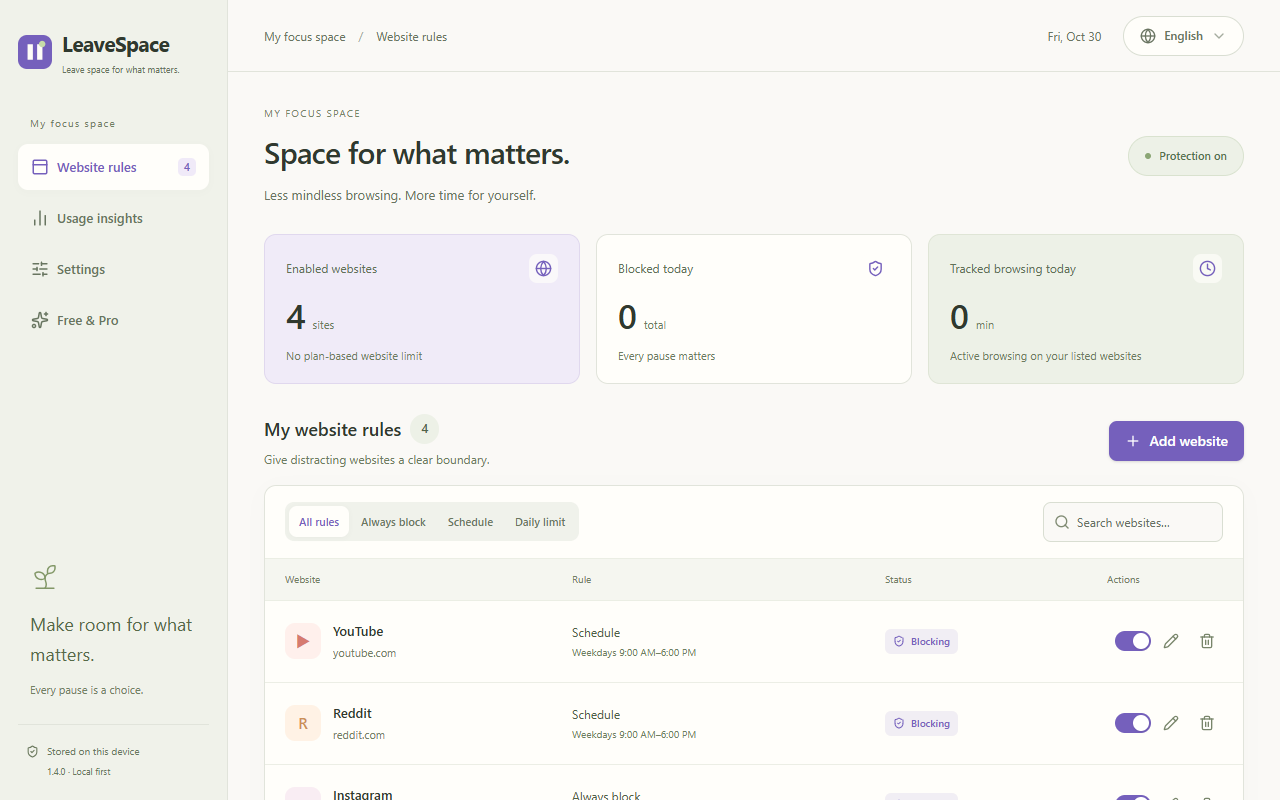
Choose the scope that fits your day
Consider LeaveSpace if…
- You mainly want fewer distractions in Chrome.
- You want schedules and a longer block list without paying.
- You prefer to keep browsing records on your device.
Compare broader tools if…
- You need phone apps, device sync or system-wide blocking.
- You need category filtering or cross-device sessions.
- You need daily website allowances now; LeaveSpace Pro is not available yet.
Questions before you switch
Is LeaveSpace available to install?
The Chrome Web Store submission is under review. There is no public install link yet. Once it is published, this page will link directly to the official listing.
Is LeaveSpace completely free?
The core release is free, including unlimited site rules, schedules and password protection. Pro is planned separately as a one-time purchase; no Pro payment or activation is currently available.
Can I import my BlockSite settings?
There is no direct BlockSite importer. Recreate your domains and schedules in LeaveSpace. LeaveSpace can export and import its own rule format for manual backups.
Does local storage mean the extension needs no permissions?
No. It needs website and navigation access to match rules and automatically block user-selected sites. That access is used locally; it does not mean your browsing data is uploaded.
Can it stop me from uninstalling it?
No. Password protection adds friction to changing the settings, but you can still disable or uninstall the extension or use another browser.
Sources and comparison notes
Checked against the official pages below on October 30, 2026. We have not independently tested every BlockSite plan or platform. Check its current offer before buying; a specific free-site limit and price are intentionally not quoted here.
Leave space for what matters.
Start with a few boundaries that fit your day. Keep the list as small or as long as you need.
Explore the free featuresChrome Web Store review in progress. Public installation is not available yet.